Sunday, August 18, 2013

Google To Auto-Encrypt Users’ Cloud Data For Free

Google To Auto-Encrypt Users’ Cloud Data For Free

August 16, 2013

 
Image Credit: alexyndr / Shutterstock
Michael Harper for redOrbit.com – Your Universe Online
Google has improved their cloud storage security by automatically encrypting all data stored there by customers for free. Now, any new data pushed to Cloud Storage will be encrypted as it’s being uploaded and before it’s written to a physical drive. Google will hold the cryptographic keys by default and notes all files can be encrypted before they’re sent to the cloud, thereby giving users access to their own keys.
Any existing data already in the cloud will be encrypted in the same way in the coming months, according to Dave Barth, Google product manager. He also promises regular users won’t notice any difference when using the service. The tech world is still abuzz over the unfolding story of the NSA and its surveillance programs. Tech companies like Google, Apple, Facebook and Microsoft are all taking part in the programs, although the extent to which they’re aiding the NSA remains unknown.
“If you require encryption for your data, this functionality frees you from the hassle and risk of managing your own encryption and decryption keys,” explains Barth in a Cloud Platform Blog.
“We manage the cryptographic keys on your behalf using the same hardened key management systems that Google uses for our own encrypted data, including strict key access controls and auditing.”
When a user wants to access this data, their login and password will act as keys and decrypt the files before viewing. When the user logs out of their account, the files are locked again.
Discussing the specifics, Barth says each file and its associated metadata in Cloud Storage is encrypted with its own unique key under the 128-bit Advanced Encryption Standard, or AES-128. Another key is used to access each file; this key is also encrypted and protected with the owner’s password. Going further, each of these keys are themselves encrypted by a set of master keys which are regularly rotated to avoid being cracked by hackers.
Users wanting even more protection in Google’s cloud can encrypt the files themselves before uploading. This means even if a hacker manages to crack each of Google’s keys, they will still have to crack the key used to encrypt the files before they were uploaded.
This may be an attractive option to those spooked by Google and others’ participation in the NSAs surveillance programs. Programs such as Prism and Xkeyscore allow the government to work with tech companies to obtain information about their users. Though the NSA claims this information is only used in the name of national security and only accessed when they perceive a threat, these parameters have yet to be concretely defined.
For their part, the companies are allowed to give their users only a vague idea of how many times the government has asked for this information. But even this didn’t come without a fight.
When CNet asked how Google will handle all this newly encrypted data when the feds comes asking for it, the search company simply replied “in accordance with the law.”.
“We don’t provide our encryption keys to any government. We believe we’re an industry leader in providing strong encryption, along with other security safeguards and tools.”


Source: Michael Harper for redOrbit.com - Your Universe Online


Saturday, August 17, 2013

Google Offers Automatic Cloud Storage Data Encryption, But Is Data Safer On Premises?


google, cloud computing, cloud storage, eim, information managementGoogle continues to add to the appeal of its cloud storage capabilities, this time with the announcement that users’ data that is placed in its Cloud Storage system will be encrypted by default.

Google Cloud Storage Encryption

In a Google blog post, Dave Barth, Product Manager with Google Cloud Storage, says that the new encryption abilities need no setup or configuration, require no alterations to the way users access the service and — even better — it is offered as a free service once you have subscribed to Cloud Storage.
Cloud Storage is Google’s service for those wishing to store data to the cloud, be they individuals or business users. It also integrates with Google analytics.

If you find the idea of encryption off-putting, this is probably something that you’re really going to like in that Google does all the encryption and securing for you.
According to the post, it manages the encryption keys using the same kind of technology that it uses for its own data — and you know how cagey Google is about its own data — including rigorous controls around key access and auditing.
However, Google not only encrypts the data, it also encrypts the files’ metadata using 128-bit Advanced Encryption Standard (AES-128), while the per-object key itself is also encrypted with a key that is unique to the owner of the data. That key is also encrypted with a set of encryption keys that are regularly rotated.
Users can also managed their own keys if they want. The result is a system that encrypts to about five different levels, so it may be difficult for those that don’t manage this kind of technology already.
These encryption abilities have been applied server-side already so that any new data entering Cloud Storage will be encrypted automatically. However, Google said that it will also encrypt the data that is in its cloud already in the coming months.

Google Trust Deficit?

There are two obvious problems with all this, and both relate to issues that have been highlighted in recent weeks with the Edward Snowden controversy.
The first issue is this: Earlier in the week it emerged that Google doesn’t appear to believe that Gmail users should expect their emails to be private and that it was scanning them on a mind-boggling rate for the purposes of placing adverts. Who is to say that it won’t apply the same standards to enterprise data that it is storing?
The second issue is clear from the thread of comments on Dave Barth’s blog post and goes like this: Even if your data is encrypted, what is to stop government agencies from simply requesting the encryption keys? The Snowden data would seem to indicate that some of the major web companies have few qualms about offering data access to these agencies.
This in turn puts the whole cloud versus on premises debate back to where it started originally. If enterprises really want to secure their data, do they ultimately have to keep it on premises? While there is still no definitive answer to this, the scales are weighing firmly on the side of on premises at the moment. Whether any company can offer enough guarantees to counter-balance that remains to be seen.

Thursday, August 15, 2013

Nine out of 10 senior staffers have BYOD access to corporate data

Nine out of 10 senior staffers have BYOD access to corporate data

Summary: We asked ZDNet readers how much free reign their businesses allow their employees, and the results found that not only do senior staffers generally have access to whatever corporate data they like while on the go, there isn't a security policy in place half the time.
Almost nine out of 10 senior staff members from Australian organisations have access to corporate data on their personal mobile phones.
A recent ZDNet survey of IT decision makers within Australian organisations has found that 89 percent of businesses permit some members of their senior leadership team to access corporate data from their own mobile devices.
Breaking this figure down further, over half of all respondents (57 percent) indicated that of their senior leadership team, all or almost all (81 percent to 100 percent) possess this level of access.
access-on-byod
Staff members that are allowed access to data. Click to enlarge.
(Image: CBS Interactive)
When it came to "less trusted" staff members, the level of access dropped, with 77 percent of respondents indicating that members of middle management have access. This figure again drops, to 64 percent, for all other staff.
The kind of data that was accessed by staff members is more restricted for financial data, with the company's financial data completely off limits 57 percent of the time, but these restraints are lower for customer and supplier data, at 44 percent and 43 percent, respectively.
access-to-specific-info
The type of information that staff members have access to. Click to enlarge.
(Image: CBS Interactive)
Despite the high penetration of BYOD, the security precautions taken by respondents' organisations is lacking. About half of all respondents said that their business does not have a formal, documented security policy at all. When examining better practices, only 17 percent of all respondents said that they are certified to ISO 27001 standards. An additional 11 percent were undergoing certification at the time of the survey, but the remainder had not considered it.
Despite only half of the organisations having a security policy, it was billed by respondents as one of the top methods for controlling access; 77 percent of respondents said they use an "acceptable use" policy to outline what employees can and cannot do on their mobile devices.
The other top security measure was requiring passwords on mobile devices that connect to the network. Again, 77 percent of respondents use this to reduce risk.
which-of-the-following-security-approaches-have-you-implemented-v1
Security measures that respondents have in place. Click to enlarge.
(Image: CBS Interactive)
Despite their seemingly growing popularity, the use of secure containers is one of the lowest adopted measures (28 percent) among respondents. For all of its benefits, the use of data encryption on mobile devices is also quite low (43 percent), and organisations use a mobile device management suite almost half of the time (46 percent).
The survey was conducted by CBS Interactive's insights and analytics division, and looked at the responses of over 100 IT decision makers.
Kick off your day with ZDNet's daily email newsletter. It's the freshest tech news and opinion, served hot. Get it.

Top 10 information security blogs 'By 'Dejan Kosutic on May 07, 2012'

'By 'Dejan Kosutic on May 07, 2012

 
There is a huge amount of information about information security on the Internet, so it is really difficult to stay informed about really relevant stuff. This is why I made this list – I wanted to offer a list of independent, expertly written and up-to-date blogs that will keep you right on track.
The blogs are listed alphabetically:
Information Security Blog by Anton Chuvakin
Security topics including SIEM, log management, compliance, vulnerability management and cloud security.
IT Security Blog by Mark Brooks
This blog focuses on strategies and information security programs that protect high value information assets such as intellectual property, trade secrets, and privacy data.
Krebs on Security by Brian Krebs
This blog features posts on a number of recurring themes, including online crime investigations, latest threats, security updates, data breaches, and cyber justice.
Lenny Zeltser on Information Security
Presents a unique perspective on information security, based on  the author’s broad experience in IT, business and malware combat. The blog presents several infosec topics, including incident response, malicious software and risk management.
Mind Streams of Information Security Knowledge by Dancho Danchev
This blog covers trends and fads, tactics and strategies, intersecting with third-party research, speculations and real-time CYBERINT assessments, all packed with sarcastic attitude. The blog offers access to timely, insightful and independent open-source intelligence (OSINT) analyses for maintaining the necessary situational awareness to stay on top of emerging security threats.
Network Security Blog by Martin McKeay
Views on security, privacy and anything else that catches author’s attention.
Privacy and Information Security Law Blog
This blog covers important aspects of information security rarely covered in other blogs – privacy and information security law updates and analysis.
Schneier on Security by Bruce Schneier
A blog covering security and security technology – the author explains, debunks, and draws lessons from security stories that make the news.
Security Affairs by Pierluigi Paganini
This daily updated blog is focused on all the areas in the security sphere. Its target is to make security a theme accessible to professionals and laymen alike, with an objective judgment on the main security events with specific attention to the subjects of cyber warfare, cyber crime and hacking.
TaoSecurity by Richard Bejtlich
TaoSecurity blog is one of the original security blogs – it will soon be ten years old. It focuses on incident detection and response for targeted threats, with emphasis on Chinese intruders.
And by the way, Security Bloggers Network offers links to over 100 various information security blogs.

Thursday, August 8, 2013

Informatiebeveiliging bij DUO loopt 'voortdurend risico'


Bewerkt door: Redactie
8-8-13 - 12:09  bron: ANP
Eerstejaarsstudenten zoeken naar hun mentor in het Wilhelminapark op de eerste dag van de Utrechtse Introductie Tijd (UIT) vorig jaar. © anp.
De persoonlijke en financiƫle gegevens van meer dan 600.000 studenten lopen gevaar. De informatiebeveiliging van de Dienst Uitvoering Onderwijs (DUO), de instantie die onder meer verantwoordelijk is voor de studiefinanciering, loopt 'voortdurend risico''.
Dat staat in een rapport van het Ministerie van Onderwijs, dat onlangs via een WOB-verzoek naar buiten werd gebracht en waar ScienceGuide donderdag over bericht. De risico's zijn al langer bekend, maar er is nog onvoldoende vooruitgang geboekt. 'Geen gewenste situatie'', staat in het 'Samenvattend Auditrapport 2012' van het ministerie.

Tuesday, August 6, 2013

Gegevensuitwisseling voor veiligheid - de kracht van koppelen

Gegevensuitwisseling voor veiligheid


De kracht

van koppelen


De dertien basisregistraties in Nederland bevatten een keur

aan gegevens.Gegevens uitwisseling biedt kansen voor

keten samenwerking binnen de veiligheidspraktijk. Maar


vanwege de foutenmarges is zorgvuldigheid daarbij geboden,

schrijven Wimfred Grashoff en Mireille Reijs.

Professionals in het veld van handhaving en


criminaliteitsbestrijding zijn gebaat bij

goede informatie-uitwisseling. Daarbij gaat

het maar ten dele om de techniek van de

informatiesystemen. Net zo belangrijk zijn de wettelijke

kaders die gegevensuitwisseling mogelijk

maken, en (bestuurlijke) afspraken tussen organisaties

over hoe gegevens worden vastgelegd. Over dat

laatste gaat dit artikel. Want als partijen dezelfde

dingen – bedrijven, gebouwen of mensen – verschillend

noemen of indelen, dan is het lastig om gegevens

uit te wisselen. De basisregistraties van de

overheid kunnen een belangrijke bijdrage leveren

aan de oplossing.

door Wimfred Grashoff en Mireille reijs

Wimfred Grashoff is implementatieadviseur bij

de stichting ICTU, Mireille Reijs is tekstschrijver bij

communicatiebureau Nawwara.

In opkoMst

Het zogenoemde stelsel van Basisregistraties van de

Nederlandse overheid bestaat uit dertien registraties.

Elke registratie bevat authentieke gegevens die door

alle overheidsinstellingen verplicht en zonder nader

onderzoek worden gebruikt bij de uitvoering van hun

publiekrechtelijke taken. De registraties bevatten niet

alleen gegevens van personen en adressen, maar ook

bijvoorbeeld bedrijfsnamen, WOZ-waarden en voertuiggegevens.

Een aantal registraties bevat ook geografische

informatie, zoals coƶrdinaten en kaarten.

Sommige basisregistraties worden al veel gebruikt,

zoals de Gemeentelijke Basisadministratie Personen

(GBA). Bij andere, zoals het Handelsregister en de

Basisregistraties Adressen en Gebouwen (BAG) is

het gebruik in opkomst. En registraties zoals de

Basisregistratie Ondergrond zijn nog in ontwikkeling.

De dertien Nederlandse basisregistraties

vormen in toenemende mate een samenhangend

56 secondant #3/4 | juli-augustus 2013


>>

geheel, doordat ze worden gekoppeld. Bijvoorbeeld:

in het Kadaster wordt verwezen naar personen uit

de GBA en naar bedrijven uit het Handelsregister.

En de GBA gebruikt adressen uit de BAG.

GeGevensWoorDenboek

Wat betekenen de basisregistraties voor de veiligheidspraktijk?

Er zijn al sprekende voorbeelden te

vinden in andere sectoren. Neem de vooringevulde

elektronische aangifte, waarmee belastingplichtigen

in Nederland de laatste jaren kennis hebben gemaakt.

De Belastingdienst vult daarbij al een aantal gegevens,

zoals het loon en de WOZ-waarden – van tevoren

in. Dat kan doordat de Belastingdienst gegevens

koppelt aan een uniek persoonsgebonden nummer,

het burgerservicenummer (BSN), en controles uitvoert

via een koppeling met de GBA.

Frauderen met

uitkeringen is

een stuk lastiger

geworden


Ook voor overheidsorganisaties die zich bezighouden

met werk en inkomen, zoals de Sociale Verzekeringsbank,

het UWV en de sociale diensten, is het BSN een

belangrijke sleutel tot het delen en uitwisselen van

gegevens. Cruciaal in deze keten is een digitaal netwerk

waarin de ketenpartners hun gegevens delen,

het Suwinet. Daarmee kunnen zij eenvoudig elkaars

gegevens raadplegen. Dat kan omdat alle partijen die

deelnemen aan het Suwinet de eigen gegevens koppelen

aan het BSN. De samenwerking wordt verder

ondersteund door een ‘gegevens woordenboek’ met

definities en afspraken over gegevens(vastlegging).

Doordat de ketenpartners in werk en inkomen afspreken

hoe gegevens worden vastgelegd en die gegevens

ook daadwerkelijk delen, is frauderen met uitkeringen

een stuk lastiger geworden.

Een goed voorbeeld in het domein van handhaving

en criminaliteitsbestrijding is het risicogericht

inspecteren. Dat betekent dat toezichthouders

meer controleren bij risicobedrijven en minder bij

bedrijven die zich aan de regels houden. De rijksinspecties

en inspectie- en opsporingsdiensten

gebruiken hiervoor het zogenoemde Inspectieview.

Via dit virtuele dossier kijken inspecties als het ware

even mee in de administraties van collega’s. De

gebruiker krijgt bij een zoekopdracht met een

bedrijfsnaam een actueel overzicht van alle inspectiegegevens

die bij het betreffende bedrijf horen.

basisregistraties

kunnen vastgoedcriminaliteit

helpen

opsporen


Een knelpunt bij Inspectieview heeft te maken met

eenduidige registraties. Als de ene inspectie een

bedrijf onder de naam ‘Van der Poel en zonen’ registreert,

en de andere onder ‘Handelsmaatschappij

v.d. Poel’, dan is de kans groot dat er geen relevante

bevindingen worden getoond. Dit effect blijkt nog

sterker wanneer inspecties grote bestanden analyseren

en vergelijken. Het gebruik van basisregistraties

voorkomt dit soort problemen. Want als alle

aangesloten inspecties in hun registraties de

bedrijfsnaam en het nummer van de Kamer van

Koophandel (uit het Handelsregister) zouden

overnemen, dan is de trefkans aanzienlijk groter.

verDachte constructIes

De basisregistraties kunnen ook vastgoedcriminaliteit

helpen opsporen. Neem de infobox Crimineel en

Onverklaarbaar Vermogen (iCOV) van de Belastingdienst,

de Fiscale Inlichtingen- en Opsporingsdienst,

het Openbaar Ministerie, de politie en de

Financial Intelligence Unit. De iCOV koppelt gegesecondant

Sunday, August 4, 2013

Mailvelope: use OpenPGP encryption on Gmail, Yahoo, Hotmail and other webmail services


By on August 4, 2013 - Tags:
If you prefer to use a webmail interface such as those provided by Gmail, Hotmail or Yahoo! Mail, you probably know that you cannot really secure your data directly when you are using those services. The majority of popular webmail services do not support email encryption for instance which would protect the content of messages from being read by automated tools and anyone else with access.
Mailvelope is a free browser extension for Google Chrome and Mozilla Firefox that introduces OpenPGP encryption to webmail services that you may be using. The extension ships with support for Gmail, Yahoo! Mail, Outlook and GMX by default, and options to integrate other web-based email providers as well.
Setup is a little bit complicated, especially if you have never worked with PGP before. After you have installed the extension in your browser of choice, it is necessary to either create a new encryption key or import an existing one.

OpenPGP for webmail services

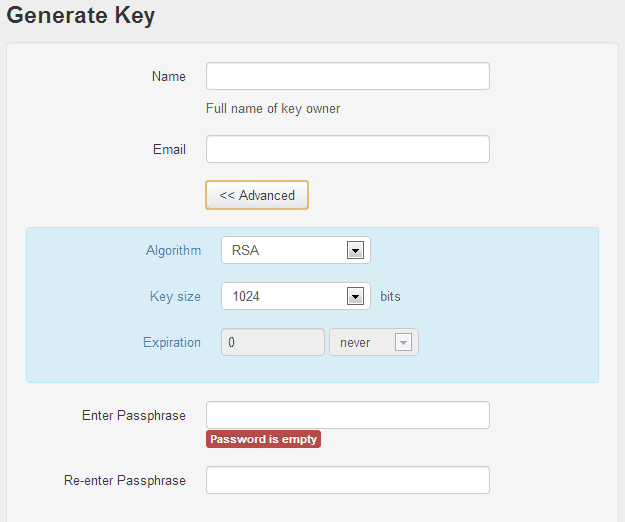
If you need to generate a new key, you are asked to enter your name and email address, and a passphrase that is used to encrypt and decrypt messages. If you want, you can also change the algorithm and key size (default 1024 up to 4096), and set an expiration date.
generate pgp key
You need to import public keys as well here from your contacts so that you can encrypt messages for them.
Let me explain how the encryption process works. PGP uses a private and public key pair system. When you generate a new set of keys, you generate a private key and a public key. Others use your public key to encrypt messages for you that only you can encrypt with your private key.
I recommend you check out the settings before you head out to your webmail service of choice to start encrypting your emails.
Some interesting options that you have are the following:
  1. Select whether you want to use the mail service's compose window or a separate editor.
  2. Select whether you want to decrypt messages on the page of the mail provider or a separate window.
  3. Set a primary key you want to be selected automatically.
Here you can also add other mail providers to the list of supported services.
A new icon is displayed in the compose window once you have added at least one key for a supported email address. When you click on it, a new window pops up that lets you compose the message. I highly recommend you keep the default option of composing emails in a separate window as contents may leak otherwise, for example when they are auto-saved.
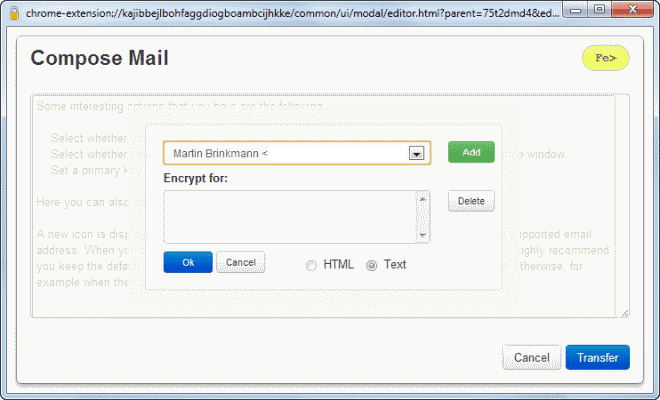
Once you have clicked on the encryption icon, you can start typing in your message. You do need to click on the Fe> icon once you are done to start the encryption process.
What you need to do is select the recipients of the email. You can only add recipients whose public keys you have imported previously into the application.
encrypt email messages
Once done hit the transfer button to send the message to all selected recipients. You may also want to add yourself to the list as you will then be able to read the messages in your send folder (and inbox).
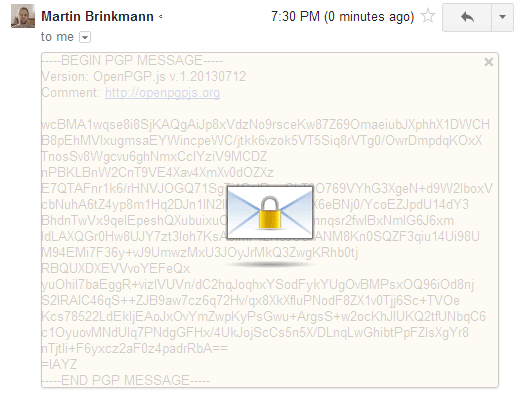
Encrypted messages appear like normal messages in your inbox. They have a plain text title but the body content is encrypted. When you open an encrypted email, you see random characters and a lock icon in the middle.
encrypted message
PGP encrypted email
A click on the icon opens a password prompt. You need to enter the correct passphrase that you have selected during key creation. The email is displayed in plain text when you do so that you can read it.

Verdict

Mailvelope adds a much needed feature to webmail services. You do face a couple of challenges though using it. First, you need to get your contacts to start using PGP as well as you can only use it effectively if that is the case.
Second, you rely on the Chrome or Firefox extension, which means that you may not be able to access your email at any time. This is for instance the case if you check your mail in a public library or on a third party computer.
The current implementation does not support the signing of messages as well.
Good news is however that it is fully compatible with existing mail encryption solutions that use OpenPGP.
Enjoyed the article?: Then sign-up for our free newsletter or RSS feed to kick off your day with the latest technology news and tips, or share the article with your friends and contacts on Facebook, Twitter or Google+ using the icons below.